YOUR ORDERS YOUR PAYOUTS ONE CLEARER PICTUREMADE BY A SELLER FOR SELLERSFROM MARKETPLACE FILES TO BUSINESS CLARITY
Settlement intelligence for marketplace sellers

See every order.
Understand every payout.

Turn Amazon, Flipkart and Meesho reports into one clear settlement view—orders, returns, costs and payouts together.


AFM
Built around the files sellers already use.
sellerqueue / settlement-overview
SELLER WORKSPACE

Settlement overview

ILLUSTRATIVE VIEW
Orders analysed2,846Selected period
Net settlement₹4.28LReport total
Returns and RTO186Needs review
Settlement movementFour week view
Reports connectedOrders and payments ready
Missing costs stay visibleNo silent zero-cost assumption
Built for India’smarketplace sellers
Amazon
AmazonMarketplace
Flipkart
FlipkartMarketplace
Meesho
MeeshoMarketplace

Settlement report processing currently supports Amazon, Flipkart and Meesho.

Seller Queue turns scattered marketplace files into a connected operating view—so orders, payouts and exceptions can be understood together.
What gets in the way

The payout number is only the end of the story.

The questions live inside the details. Seller Queue keeps those details organised around the decisions a seller needs to make.

01 · REPORTS

Files arrive in different shapes.

Orders and payments use different columns, dates and settlement logic across marketplaces. The workspace starts from the right files for each marketplace.

02 · EXCEPTIONS

Returns change the final picture.

Returns and RTO movement deserve their own view. Reviewing them beside orders and payouts makes exceptions easier to investigate.

03 · COSTS

Profit needs a real product cost.

Saved SKU costs feed supported P&L views. If a cost is missing, that SKU stays excluded from the calculation instead of being treated as free inventory.
See the workspace before you start

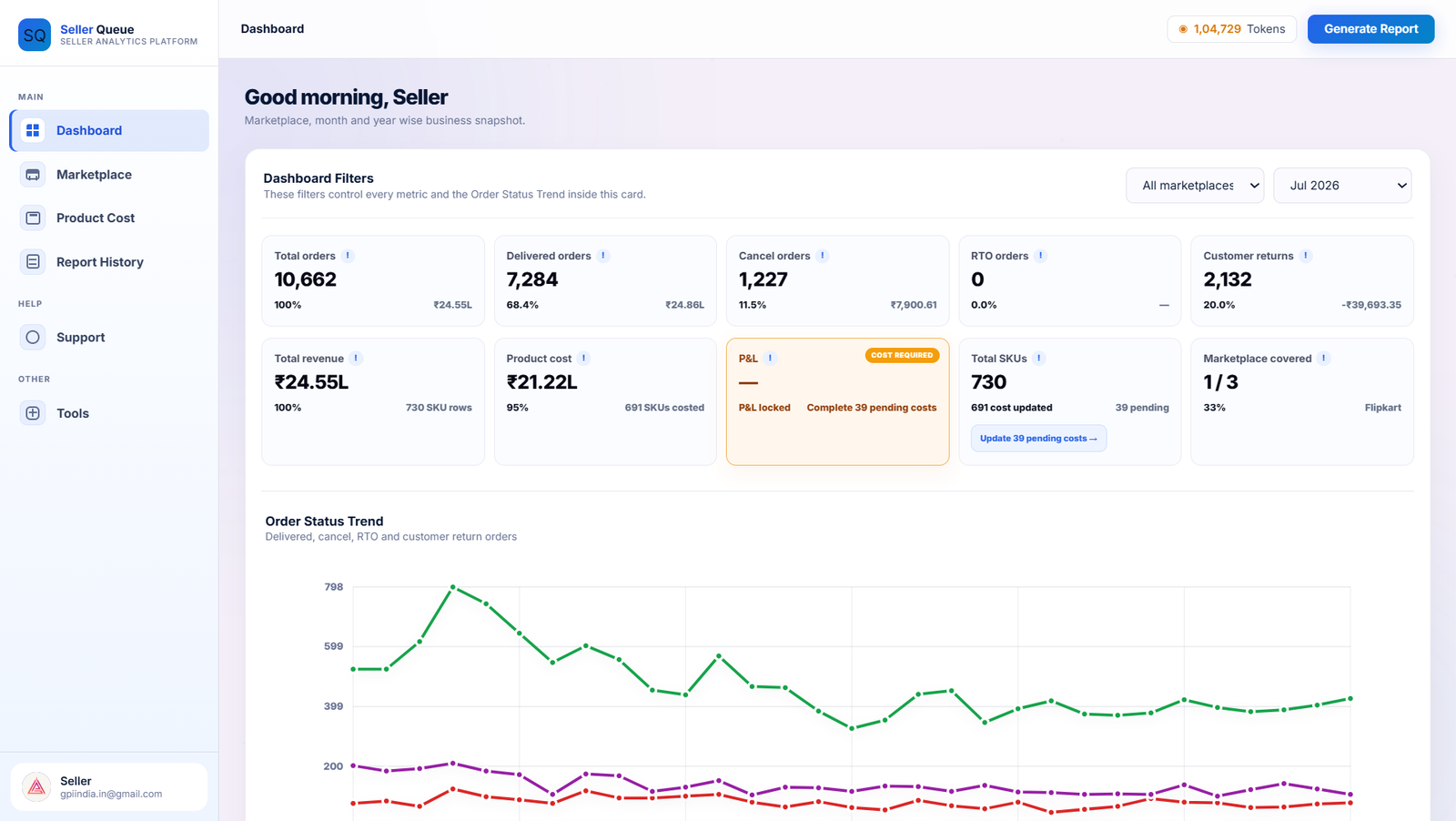
Seller data, shaped into a dashboard you can read.

Seller Queue / Dashboard
Seller Queue seller dashboard preview
01 · Business overviewOrders, returns, costs and marketplace coverage in one view.
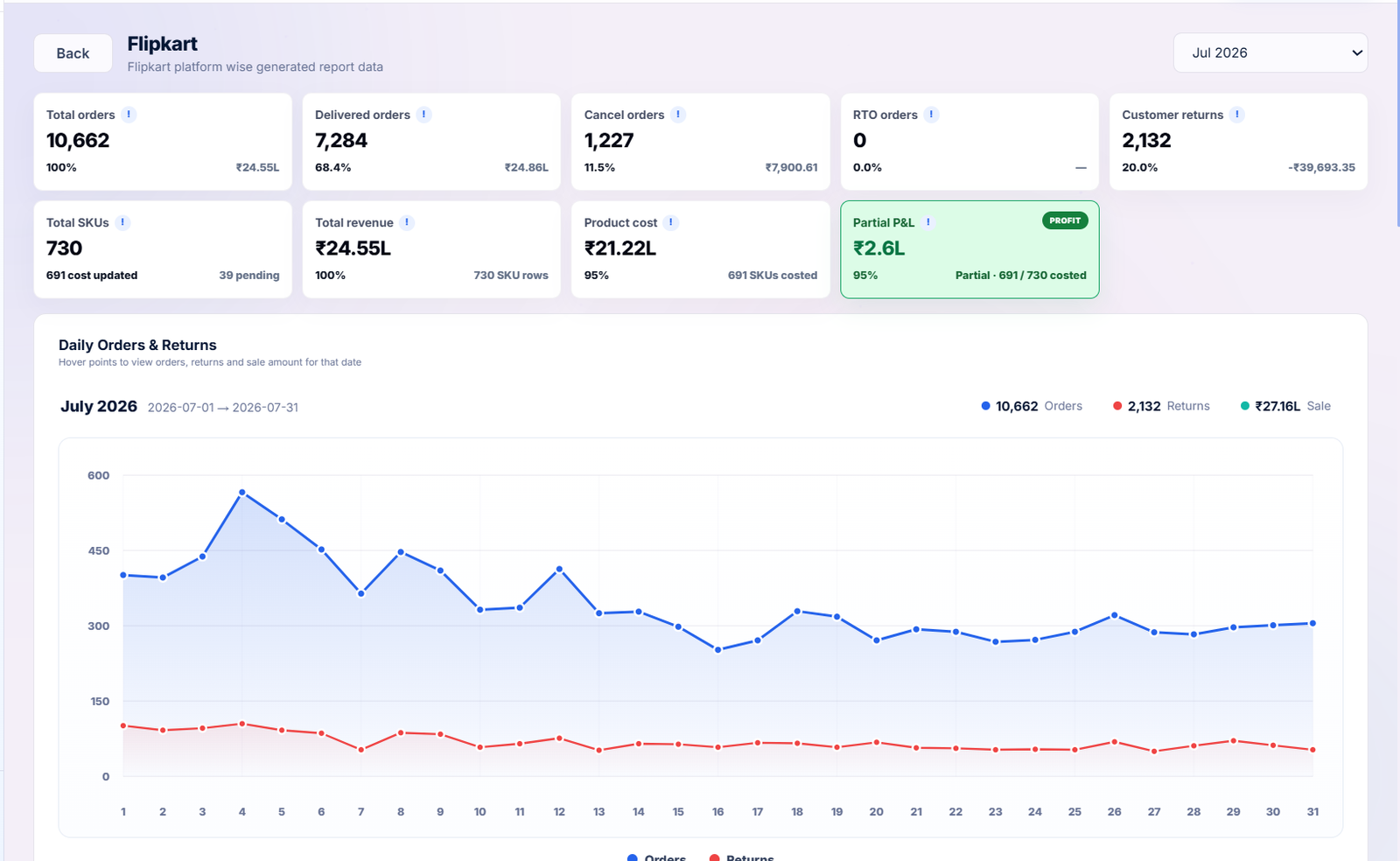
Seller Queue / Flipkart report
Seller Queue Flipkart marketplace report preview
02 · Marketplace reportOpen a marketplace and follow its daily order and return movement.
The settlement workspace

One connected view from report upload to payout review.

Bring the files together once, then move through the numbers in a clear sequence.

Connected settlement report

Follow the money without losing the order context.

Ready to review
01
Order report2,846 order rows recognised
Connected
02
Payment reportCoverage and settlement entries checked
Matched
03
Settlement viewOrders, payments and exceptions together
Review ↗
Orders analysed2,846
Net settlement₹4.28L
Needs attention32
Returns and RTO

See reverse movement in context.

Keep return events beside the period and orders they affect.

186EVENTS
Customer returns112RTO74
Product costs

Know what is complete before reading profit.

Saved costs contribute to supported P&L views. Missing values remain visible.

SKU 001₹248Saved
SKU 002₹315Saved
SKU 003—Cost needed
How it works

A familiar start. A more useful finish.

Nothing to connect before you begin. Start with the reports your marketplace already provides.

STEP 01

Choose a marketplace

Select Amazon, Flipkart or Meesho so the workspace can ask for the correct files.

STEP 02

Upload the reports

Add the requested order and payment files. The app checks required inputs and readable date ranges.

STEP 03

Review the analysis

Explore orders, settlement totals, return movement and available cost-based insights.

STEP 04

Download and act

Export the generated Excel report, investigate exceptions and keep the result in report history.

meesho.com / supplier / product
Tools that stay close to the work

Your workflow does not end at the report.

Prepare listing images, move between supported Meesho views and keep useful seller utilities together.

Made for the person behind the store

Less time matching files. More time running your business.

Seller Queue keeps settlement work focused, so the next decision is easier to see.

Why Seller Queue ↗

Marketplace seller reviewing her business on a laptop
Settlement readyOrders and payments connected
Costs visibleMissing values stay clear
Questions before you start

Clear answers, before your first report.

Which marketplaces are supported?

The settlement workflow supports Amazon, Flipkart and Meesho. Each marketplace asks for its own required order and payment report files.

Do I have to connect my marketplace account?

The settlement workflow begins with report files you upload. The Meesho browser extension has a separate Seller Queue account pairing flow for its own features.

What happens when a product cost is missing?

In supported P&L views, a missing-cost SKU is excluded from the calculation. It is not silently counted as having zero cost.

Can I download my analysis?

Generated settlement reports can be downloaded as Excel files and revisited through available report history in your account.

Where do I ask for help?

Use Support inside the dashboard for account, report, token or billing issues. Use Contact Us for general questions, tools, the extension or partnerships.

Your next report starts here

Put every settlement in a clearer queue.

Create an account, choose your marketplace and bring the files you already use.

Community